- This topic has 1 reply, 2 voices, and was last updated 3 months, 1 week ago by
.
Viewing 2 posts - 1 through 2 (of 2 total)


Viewing 2 posts - 1 through 2 (of 2 total)
- You must be logged in to reply to this topic.
 vako.
vako.Hello. Thank you.
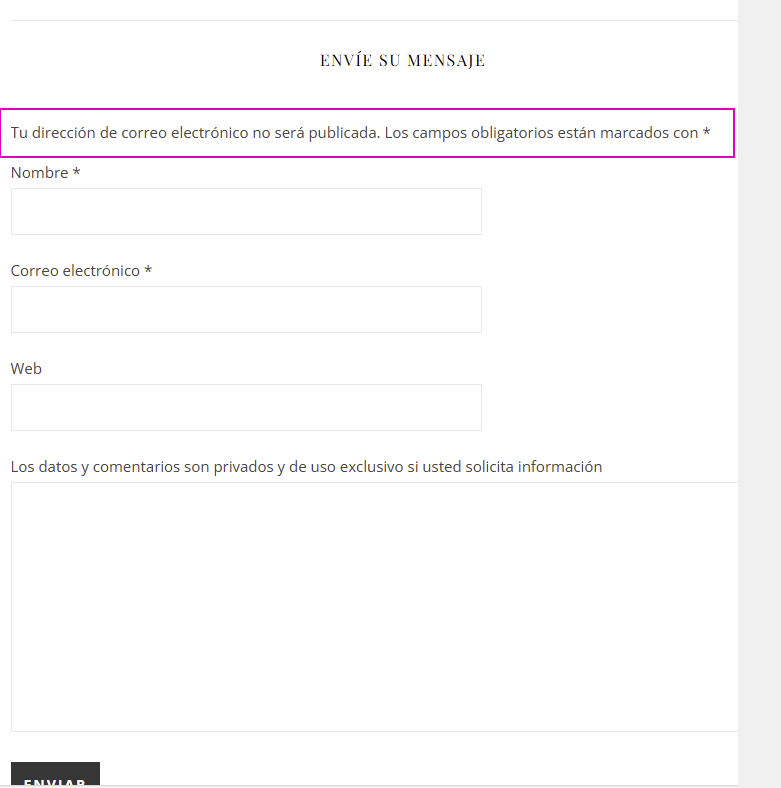
I want to know with your help, if it’s possible to change the text displayed supposedly as automatic translation in the blog, the comments form.
Instead the long sentence, just the word “your information is necessary”
and so, the famous “WEBSITE” field – just to change the label for “your town“.
I’ve tried plugins, Poedit, PHP wordpress editor theme (yes, successful for the button and label” – thank you again.
Hi,
Thank you for your message.
Yes, it’s absolutely possible to change those texts, and we’ll be happy to adjust them directly on your site. To proceed safely and make sure everything looks exactly as you want, we will need:
A temporary login URL generated with this plugin:
Temporary Login Without Password
(This lets us access your dashboard securely without sharing a password.)
The exact sentences you want displayed, just to avoid mistakes.
For example:
– Replace the long default message with: “your information is necessary”
– Replace “Website” field label with: “your town”
If anything needs to be capitalised differently, please write it exactly as you want it to appear.
Once we have the login URL and the final text versions, we’ll handle everything for you.
Kind Regards